
By Emily Foster, Customer Experience Research Lead at Reviewance
For years, businesses have asked us the same question.
"Where should we put our Google Review QR code?"
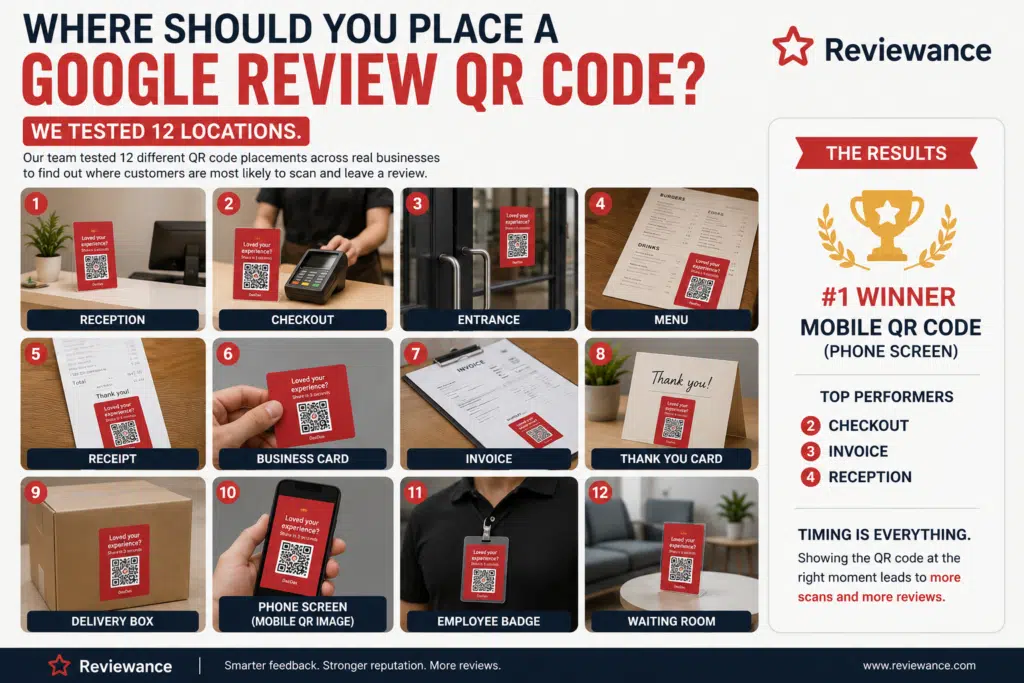
At first, the answer seemed obvious. Put it near the checkout. Or maybe at reception. Some businesses preferred printing it on receipts, while others displayed it on menus or business cards. Everyone had an opinion but very few had actual data. Instead of relying on assumptions, our Customer Experience Research Team at Reviewance decided to find out.
Over six weeks, we partnered with dozens of local businesses—including restaurants, dental clinics, med spas, cafés, retail stores, and hotels—to test where customers were actually most likely to scan a Google Review QR code. Rather than measuring opinions, we measured scans, completed reviews, and customer behavior. The results surprised even us.
How We Ran the Experiment
Our goal wasn't simply to discover where customers noticed a QR code. We wanted to identify the locations that produced the highest number of completed Google reviews while fitting naturally into the customer journey.
To keep the experiment as fair as possible, every QR code directed customers to the same review flow. The design remained identical, the messaging stayed consistent, and participating businesses were asked to invite customers using the same friendly script. The only variable we changed was where the QR code appeared. After several thousand cstomer interactions, clear patterns began to emerge.
Location #1: Reception Desk
Reception desks performed well, especially in healthcare clinics, beauty salons, and hotels where customers naturally spend a few moments waiting.
Customers noticed the QR code, but many were focused on checking in rather than reflecting on their experience. Since they hadn't yet received the service, relatively few decided to leave a review at that point.
Result: Good visibility, but poor timing.
Location #2: Checkout Counter
This quickly became one of our strongest performers.
By the time customers reached the checkout, they had already completed their visit and were usually satisfied with the experience. Staff could naturally ask whether everything had gone well before inviting them to leave a review.
Because customers were already holding their phones to pay in many cases, scanning the QR code felt effortless.
Result: Excellent conversion.
Create your review QR codes
Your business name
First month only $1, then just $9.99/month. Cancel anytime.
Location #3: Entrance Door
Many businesses like placing QR codes near the entrance because they're highly visible. Visibility wasn't the problem but the Intent. Customers entering a business simply aren't thinking about leaving reviews. They're thinking about the appointment, the meal, or the purchase they're about to make. Most people walked straight past the QR code without noticing it.
Result: High visibility, very low engagement.
Location #4: Restaurant Menu
Restaurants often print QR codes directly on menus. While diners definitely saw the code, they were focused on choosing food rather than reviewing the restaurant. Only a small percentage scanned it.
Result: Better awareness than conversions.
Location #5: Printed Receipt
Receipts have been one of the most common places for review requests for years. Unfortunately, our research showed why they often disappoint. Most customers folded the receipt into a pocket or threw it away before reading anything printed near the bottom. Even customers who noticed the QR code rarely scanned it after leaving.
Result: Low engagement.
Location #6: Business Card
Business cards performed similarly to receipts. Customers appreciated receiving them, but very few acted immediately. Every additional delay reduced review completion.
Result: Limited impact.
Location #7: Invoice
Invoices worked surprisingly well in B2B services and automotive businesses. Customers naturally spent a few moments reviewing the invoice before paying, giving staff an opportunity to introduce the QR code. Still, results depended heavily on whether employees actively mentioned it.
Result: Moderate performance.
Location #8: Thank You Card
Businesses that included a small thank-you card inside shopping bags or takeaway orders saw slightly better engagement than receipts. Customers perceived the request as more personal. However, once the customer left the store, participation still declined.
Result: Better than receipts, but not among the top performers.
Location #9: Delivery Box
For delivery businesses, adding a QR code inside the package seemed promising. Unfortunately, timing worked against us again. Customers often opened deliveries while distracted, eating, or unpacking multiple items. Many intended to scan the QR code later. Few actually did.
Result: Below expectations.
Location #10: Mobile QR Code (Displayed on an Employee's Phone)
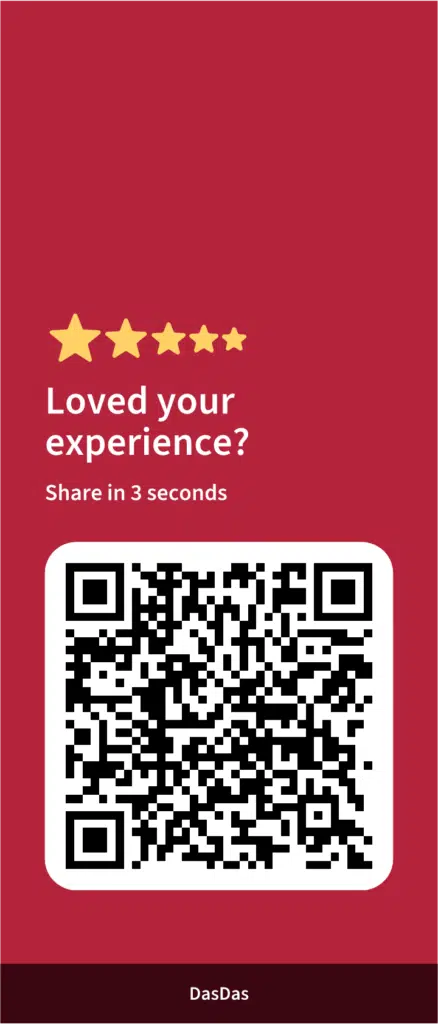
This completely changed the rankings. Instead of relying on printed materials, employees simply opened their personalized Reviewance Mobile QR Code and showed it directly to customers immediately after a successful interaction.
Customers already had their phones in hand. Scanning took only seconds and there was nothing to search for. Nothing to remember later. Across nearly every industry we tested, this generated the highest number of completed Google reviews. The difference wasn't just statistically significant.
It was obvious.
Location #11: Employee Name Badge
Some businesses experimented with adding QR codes directly to employee badges. Customers noticed them, but the codes were often too small to scan comfortably. The concept was creative. The execution proved difficult.
Result: Interesting idea, inconsistent results.
Location #12: Waiting Room
Waiting rooms performed better than expected, particularly in medical clinics and automotive service centers. Customers already had their phones out while waiting, making the QR code easy to notice. However, asking customers for reviews before they experienced the service limited conversions.
Result: High visibility, average review generation.
What We Learned
At the beginning of this project, we thought placement was primarily about visibility. It wasn't. It was about timing. The highest-performing QR codes weren't necessarily placed where customers looked the most. They were placed where customers felt the most satisfied. That subtle difference changed everything. The moment immediately after a positive customer experience consistently produced the highest review completion rates.
Why Mobile QR Codes Came Out on Top
The Reviewance Mobile QR Code wasn't successful simply because it was digital. It succeeded because it removed friction. There were no printed materials to manage. No posters to replace. No acrylic stands to move. No assumptions about where customers would notice them. Employees simply displayed the QR code directly from their phones at exactly the right moment. That combination of perfect timing and minimal effort consistently outperformed every static placement we tested.
Final Notes from the Research
If you're wondering where to place a Google Review QR code, the answer isn't a reception desk, a receipt, or a business card. The best place is where your happiest customer is standing immediately after a great experience. Sometimes that happens at checkout. Sometimes beside a restaurant table. Sometimes at the reception desk. With a mobile QR code, it can happen anywhere.
That's exactly why it became the clear winner in our research.